Formatting Feature Files
The Cycle Editor can format a Feature File so that its indentation, spacing, and keyword casing follow the standard CycleScript formatting rules. By default, Cycle formats a Feature File every time you save it. You can also format a file on demand while you edit it.
Formatting changes only how the code looks, not how it runs. Cycle does not format a Feature File that contains syntax errors.
Formatting from the context menu
- Open the Feature File in the Cycle Editor.
- Right-click anywhere in the editor.
- Select Format Document.
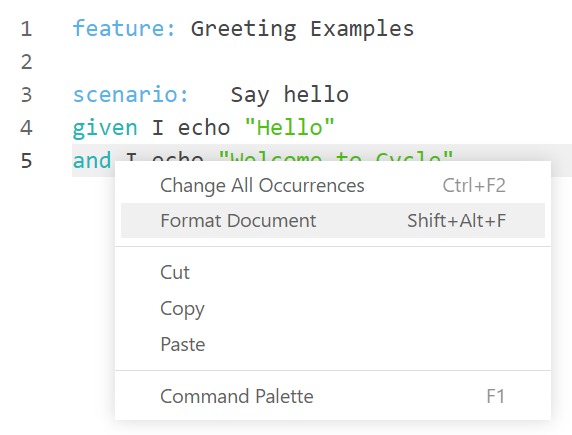
Cycle rewrites the file in the editor using the formatting rules. The file is marked as changed until you save it. To see what formatting changes in a Feature File, see Seeing formatting in action.
You can also press Shift+Alt+F to format the open Feature File without opening the context menu.
Formatting when saving
When Format feature files on save is turned on, Cycle formats the Feature File before it writes the file to disk. This applies when you save with File > Save, File > Save As, or File > Save All.
Save All formats only the Feature File in the active editor tab. Other open files are saved without formatting.
If formatting cannot finish, for example because the file has syntax errors, Cycle still saves the file without formatting it.
Changing the formatting settings
Formatting settings are part of Application Preferences, so they apply to every project you open in the Desktop IDE.
- Open Application Preferences from Edit > Preferences, or press
Ctrl+,. - Scroll to the Formatting section.
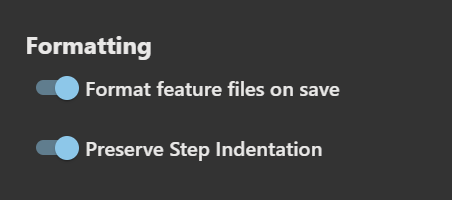
- Turn each setting on or off.
| Setting | Default | Description |
|---|---|---|
| Format feature files on save | On | Formats the Feature File each time you save it. Turn it off to format only from the context menu or keyboard shortcut. |
| Preserve Step Indentation | On | Keeps any extra indentation you add between steps, such as steps indented under an Activity step. Turn it off to indent every step in a block evenly. See Preserving step indentation. |
Preserve Step Indentation applies every time Cycle formats a file, whether from the context menu, the keyboard shortcut, or a save.
Setting the editor tab size
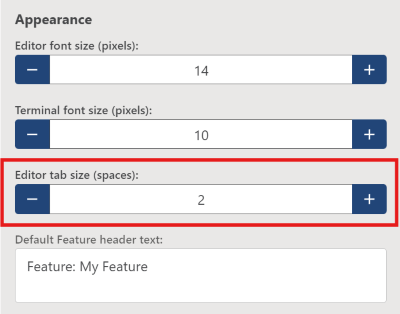
Editor tab size (spaces) sets how many spaces wide the Cycle Editor draws each tab character. The default is 2. You can set it to any whole number from 1 to 8. The setting is under Appearance in Application Preferences, so it applies to every project you open in the Desktop IDE.
A Feature File stores each indentation level as a tab character (\t).
Formatting writes those same tab characters.
Editor tab size (spaces) changes how wide each tab looks while you edit.
The .feature file keeps those tab characters when you save it.
- Open Application Preferences from Edit > Preferences, or press
Ctrl+,. - Under Appearance, set Editor tab size (spaces) with the minus and plus buttons.