Application Preferences
Profile
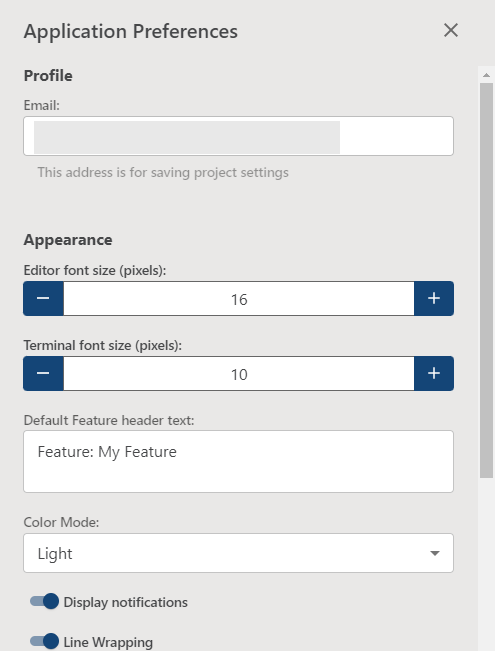
Displays the current Cycle profile being used and gives the option to switch users:
- Email: The email address of the current user profile. This is associated with the saved settings file that Cycle will use.
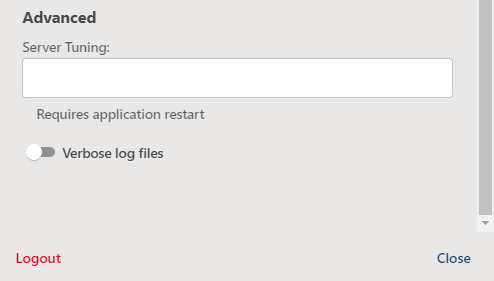
- Logout: Allows users to switch between profiles.
Appearance
- Line wrapping: Turns on or off line wrapping for lines longer than the width of the Editor pane.
- Font size: Sets the font size used in Cycle's editor.
- Default Feature header text: Sets the default text when creating a new Feature File.
- Terminal font size (pixels): Sets the font size used in Cycle's terminals.
- Color Mode: Choose between light and dark modes for your Cycle UI.
Proxy
Cycle has the ability to use proxy settings when a standard connection path is not possible. If you need to use a proxy connection, contact your Cycle administrator for the necessary settings.
Advanced
- Verbose log files: Turns on or off Cycle's more detailed event logging to aid in troubleshooting an issue. This log file can be found at:
C:\Users\YOURUSERNAME\AppData\Roaming\Cycle\logs\cycle.log - Server Tuning: Allows for the input of additional JVM parameters to tune how Cycle runs.