Playlists
A playlist is a .cycplay file that runs a collection of Feature Files together as one launch.
Playlists let you aggregate related tests into a single ordered execution.
They are useful for suites, smoke packs, and continuous testing pipelines.
Creating and editing playlists
In the Desktop IDE, you can build a playlist by:
- Dragging Feature Files from the Project Directory onto the Playlist Editor, or
- Using Add Entry / Add File to browse for Feature Files to include
You can also add an entire directory of Feature Files. Reorder entries with Move Up, Move Down, Move to Top, and Move to Bottom, or by dragging them in the editor.
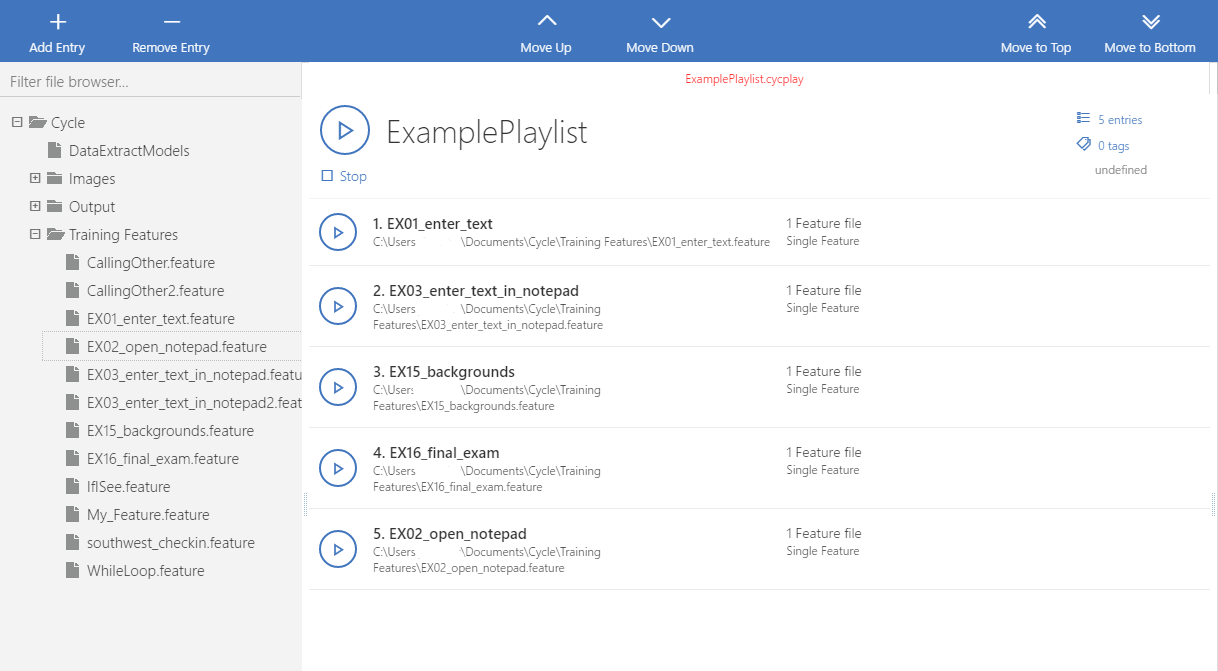
The Playlist Editor is similar to the Feature File editor in the header, but the body is a drag-and-drop list of Feature Files. See Playlist editing and the Playlist Ribbon for IDE details.
If you use Visual Studio Code, the Cycle Testing VS Code Extension provides a visual playlist editor and a text editor with syntax highlighting and validation.
Failure handling and settings
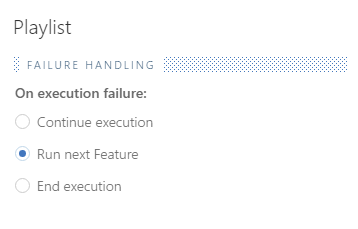
Like the Fail Fast option in Cycle Settings, a playlist has its own failure-handling option in the Settings tab. You can choose to continue the current Feature File, run the next Feature File, or end execution when a step fails.
Playlist execution uses the same configuration as a single Feature File for Cycle extensions, resource directories, and tag execution. Tag-based execution is also available in playlists.
Running playlists
You can run a playlist from the Cycle Desktop IDE or from the Cycle CLI. See Executing Playlists for how to launch a playlist, handle failures, review the Output pane, and run from the command line.
Results and reporting
Playlist results appear in the Output pane with an extra level that groups by parent Feature File. A playlist produces a single report when it completes. Details are covered under Executing Playlists.
For interactive results while developing, use the Report Dashboard. For durable, shareable output, use classic reporting.