Execution Settings
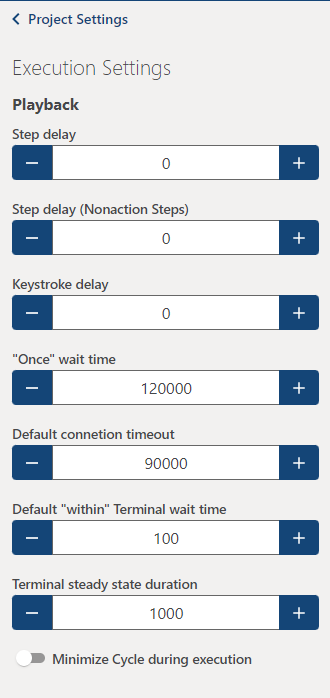
Execution settings is the largest subsection of Preferences containing:
Playback
- Step delay: Adds additional wait time between steps to slow down execution for easier viewing.
- Step delay (Nonaction steps): Secondary step delay specifically for steps that do not trigger any action outside of Cycle itself.
- Keystroke delay: Adds a delay between individual keystrokes.
- "Once" wait time: Determines the upper limit for how long steps using the 'Once' keyword should wait before failure.
- Default connection timeout: Determines the upper limit for how long Cycle should wait before timing out on a terminal connection attempt.
- Default "within" Terminal wait time: Determines the upper limit for how long steps executing inside of a terminal should wait before failure.
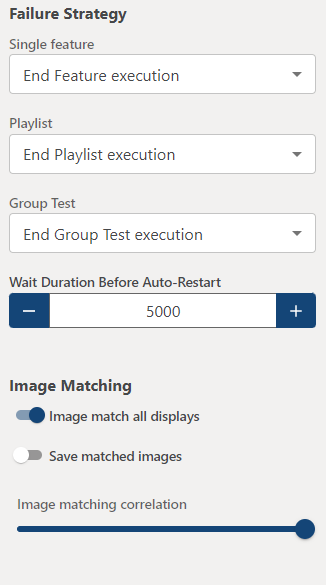
Failure strategy
- Determines what Cycle should do in the event of a failure on a single Feature File, playlist, or group test.
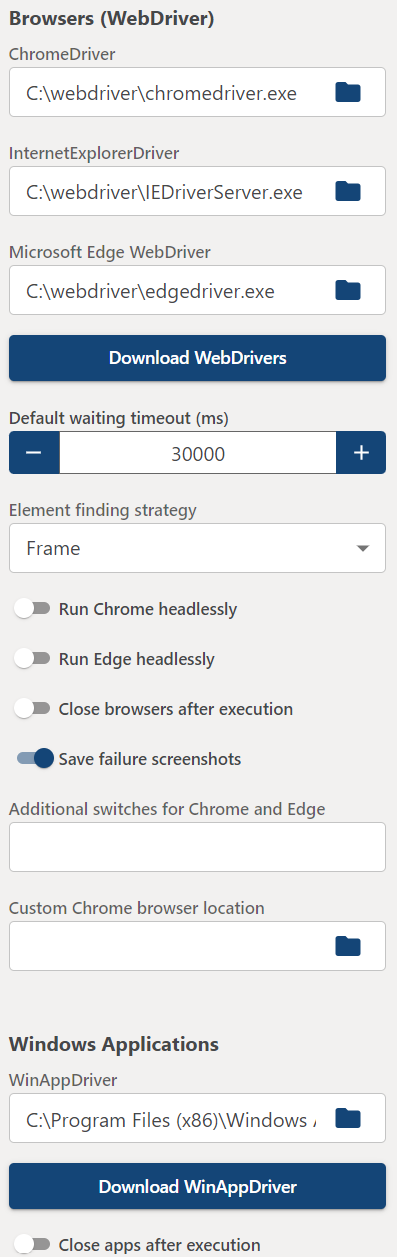
Browsers (WebDriver)
- ChromeDriver: The location of the ChromeDriver.exe for opening a Google Chrome browser with Cycle.
- InternetExplorerDriver: The location of the IEDriverServer.exe for opening an Internet Explorer browser with Cycle.
- MicrosoftEdgeDriver: The location of the MicrosoftWebDriver.exe for opening an Edge browser with Cycle.
- Download WebDrivers: Redirects to user manual page with links to download WebDrivers.
- Default waiting timeout (ms): Sets the amount of time in milliseconds that Cycle will wait to find an element or validate a condition before failing a step.
- Element finding strategy: Tells the WebDriver how to search for elements, either Frame to search through all frames automatically or Normal to avoid iframes and handle them with steps.
- Run Chrome Headlessly: Runs Chrome browsers without rendering them onscreen.
- Run Edge Headlessly: Runs Edge browsers without rendering them onscreen.
- Close browser after execution: Closes any browser opened by a Scenario before continuing to the next Scenario.
- Save failure screenshots: Cycle takes a screenshot when a web step fails. Turn this off to disable that behavior.
- Additional switches for Chrome and Edge: Lets you set browser options if needed.
- Use custom Chrome browser: Enables pointing Cycle at a custom Chrome browser instead of the default install.
- Custom Chrome browser location: Used for pointing Cycle at a custom Chrome browser.
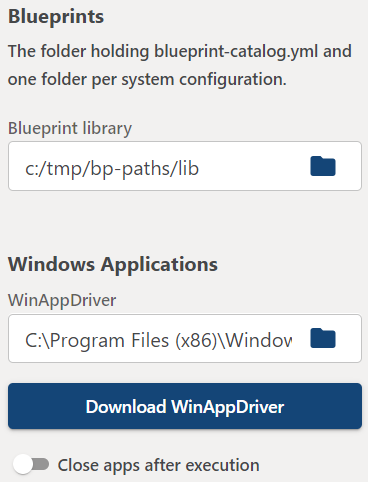
Blueprints
- Blueprint library: The folder holding
blueprint-catalog.ymland one folder per system configuration. Points the project at its Blueprint library so Cycle can run Blueprints by catalog ID or resolve asystem_config.
Windows applications
- WinAppDriver: The location of the winappdriver.exe for opening a Windows application with Cycle.
- Download WinAppDriver: Redirects to user manual page with links to download WinAppDriver.
- Close apps after execution: Closes any apps opened by a Scenario before continuing to the next Scenario.