Handling Images
Some Cycle Steps use image files to perform a test or action.
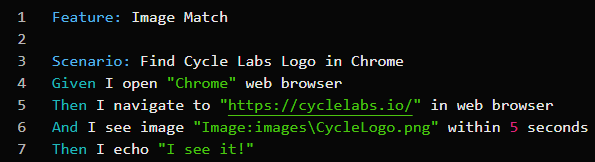
In the example below, Cycle opens the Google Chrome browser and navigates to www.cyclelabs.io. Next, Cycle confirms that the Cycle Labs logo is visible within 5 seconds.
The file path for CycleLogo.png in line 6 begins with images\ because the file is located in the Images subfolder of the default resource directory.
Below the line, the Image Accessory shows a preview of the image being used and allows renaming of the file when necessary.
Graphic images used by Cycle must be stored as Portable Network Graphic (PNG) files.
By default, Cycle stores graphic images as .png files in an images folder within the resource directory.
Images can be added to a Step by capturing a new image, dragging an existing image from the File Browser into the Step, or typing the path to the image directly into the Step.