Cycle CLI Commands and Parameters
This page is the reference for the cycle-cli commands, the parameters each one accepts, and the error handling strategies available to a run.
Run cycle-cli --help for the same inventory from the binary you have installed, or cycle-cli <command> --help for a single command.
Commands
cycle-cli takes a command as its first argument.
| Command | Purpose |
|---|---|
run | Run Cycle tests |
auth | Manage Cycle authentication |
create | Create a new Cycle project or step plugin project |
validate | Lint CycleScript files, or check environment health |
open | Open a Cycle resource, such as the Step Guide |
version | Print the build version, hash, and release date |
run
cycle-cli run [parameters] [files] executes a Feature File, playlist, or group test.
See Running Tests from the Command Line for worked examples.
Required parameters
| Parameter | Description | Example |
|---|---|---|
| Feature, playlist, or group test | Path to the Feature File (.feature), playlist (.cycplay), or group test (.cvt) to execute. Pass several Feature Files to run them in sequence. | cycle-cli run C:\path\to\feature\feature_name.feature or cycle-cli run C:\path\to\playlist\playlist_name.cycplay |
.yml or .yaml target runs as a Blueprintcycle-cli run data.yml runs the file as a Blueprint rather than as a test.
Cycle decides this by extension alone, and a Blueprint target accepts a different parameter set from the one below: -p, -u, -l, -offline, and -offline-setup only.
Only one Blueprint target is allowed per command.
See Running a Blueprint.
Optional parameters
| Parameter | Description | Example |
|---|---|---|
--client-credential [arg] | Client secret for authenticating via the client credential auth flow | cycle-cli run --clientid $ID --client-credential $SECRET [files to run] |
--clientid [arg] | Client ID for authenticating via the client credential auth flow | cycle-cli run --clientid $ID --client-credential $SECRET [files to run] |
--db-file-output-directory [arg] | Directory to copy the .db file to upon shutdown | cycle-cli run --db-file-output-directory C:\Cycle\Db [files to run] |
--env-file [arg] | Load environment variables from a custom .env file | cycle-cli run --env-file "path/to/.env" [files to run] |
-e, --error-handling [arg] | Error Handling Strategy (see Error handling strategies) | cycle-cli run --error-handling ALL_TESTS [files to run] |
-l, --log-level [arg] | Logging level. One of ERROR, INFO, or DEBUG. | cycle-cli run --log-level DEBUG [files to run] |
--no-tick | Turn off time-elapsed update for steps | cycle-cli run --no-tick [files to run] |
-o, --output-directory [arg] | Report output directory | cycle-cli run --output-directory C:\Cycle\Output [files to run] |
-p, --project-file [arg] | Project directory (this must be a directory containing a .cycproj file). If the current directory is the project directory, then this argument is optional. Otherwise, it is required. | cycle-cli run --project-file C:\Cycle\MyProject [files to run] |
--settings [arg] | Additional settings as key value pairs. For multiple settings, use multiple flags. | cycle-cli run --settings ProduceLocalReport=true [files to run] |
--settings-file [arg] | Settings file location to override settings used in Cycle client | cycle-cli run --settings-file C:\Cycle\settingsoverride.json [files to run] |
-t, --tags [arg] | Tags to be executed. For multiple tags, use multiple flags. | cycle-cli run --tags receiving --tags picking [files to run] |
-u, --user-profile [arg] | An alternate .cycuser file to use when executing tests | cycle-cli run -u jenkins.cycuser [files to run] |
--verbose-group-test | Show step-level console output during group test execution | cycle-cli run --verbose-group-test [files to run] |
-x, --shutdown-timeout [int] | Forcibly terminate Cycle upon test completion (in seconds) (default -1) | cycle-cli run -x 300 [files to run] |
Echoing the settings a run would use
cycle-cli --echo-settings prints the settings Cycle resolved, then exits without running anything.
Pass it on its own: it is a mode rather than a run parameter, so it accepts no command and no other parameters.
Deprecated parameters
These three parameters still work and still take effect, so existing scripts and pipelines do not need to change.
Cycle omits them from cycle-cli --help and prints a warning to standard error naming the replacement.
The warning never reaches standard output, so a pipeline that parses report content is unaffected.
| Deprecated parameter | Description | Use instead |
|---|---|---|
--skip-initial-purge | Skip attempting to clean up internal DB files at startup | Nothing yet. This remains the supported way to run multiple instances of Cycle in parallel, as described in Running cycle-cli in parallel. |
--token [arg] | Token for authentication (available since 2.14) | cycle-cli auth login --token, which stores a session that later runs reuse |
--verbose-shutdown | Verbose logging during shutdown | --log-level DEBUG, which reports the same shutdown diagnostics |
auth
cycle-cli auth <sub-command> manages the login session.
See Running Cycle CLI in Pipelines for which method suits which machine.
| Command | What it does |
|---|---|
cycle-cli auth login | Log in, interactively by default, or with client credentials, or with a token |
cycle-cli auth logout | Clear the stored session |
cycle-cli auth whoami | Show the signed-in user, token expiry, and credential source |
login is the only sub-command that takes parameters.
logout clears the stored session and reports Logged out., after which a later run has to authenticate again.
auth login
| Parameter | Description | Example |
|---|---|---|
--client-id [arg] | Client ID for a client-credential login. Supply with --client-secret. | cycle-cli auth login --client-id $ID --client-secret $SECRET |
--client-secret [arg] | Client secret for a client-credential login. Supply with --client-id. | cycle-cli auth login --client-id $ID --client-secret $SECRET |
--token [arg] | Refresh token to log in with. Stores the session for later runs. | cycle-cli auth login --token $TOKEN |
With no parameters, auth login opens a browser for an interactive sign-in.
CYCLE_CLI_CLIENT_ID and CYCLE_CLI_CLIENT_SECRET stand in for the credential parameters when both are set and no parameter is given.
Obtaining a token
Applicable for Cycle 2.14 and beyond
The token --token expects is a refresh token copied from the Cycle UI.
Open the Cycle UI and navigate to Help > Copy Authentication Token.
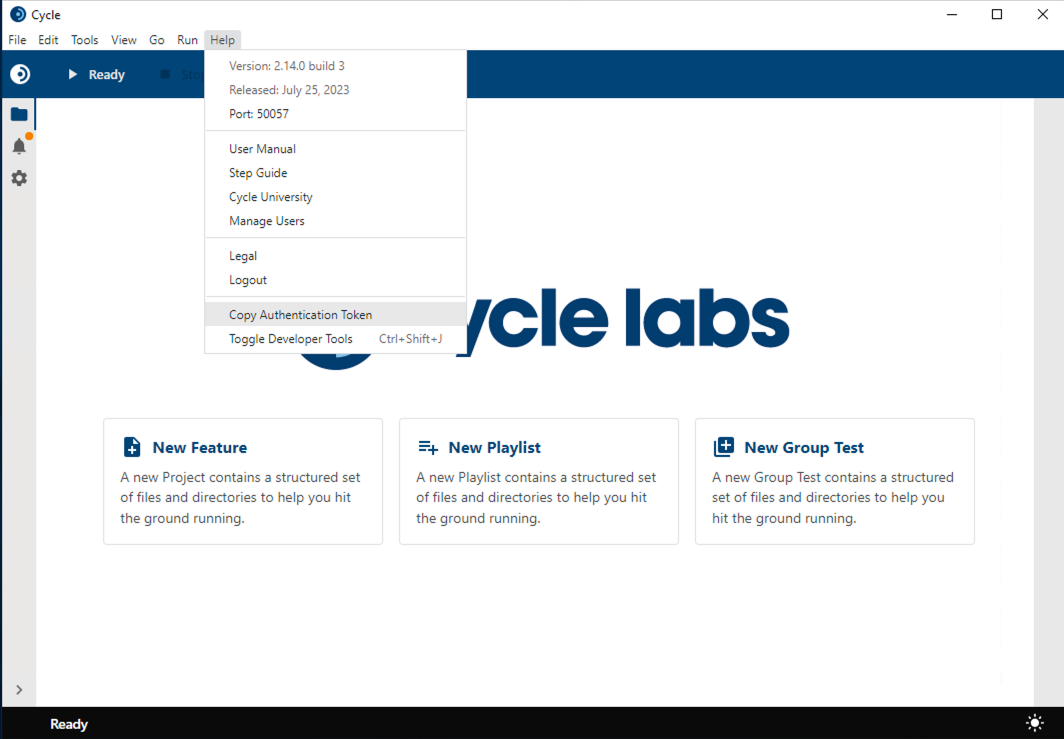
This copies the token to your clipboard. Treat it as a secret and inject it from secure storage rather than typing it into a script.
Tokens expire, so keep them up to date.
cycle-cli auth whoami reports the expiry of the current session, and a run fails once the token behind it is no longer valid.
Interpreting whoami output
cycle-cli auth whoami reports the identity a run would use.
It reads local state only, with no call to the authentication service.
cycle-cli auth whoami
Signed in as j.doe@cyclelabs.io
  Token expires:     2026-09-30T14:02:11Z
  Credential source: config file
| Credential source | Meaning |
|---|---|
config file | The identity comes from a session stored on this machine. |
environment variable | CYCLE_CLI_CLIENT_ID and CYCLE_CLI_CLIENT_SECRET are both set. This takes precedence over a stored session. |
whoami reports Not signed in. when neither is present.
An expired stored session is reported as expired rather than as signed out.
See Running Cycle CLI in Pipelines for how a pipeline supplies credentials.
create
cycle-cli create scaffolds a new resource at a path you name.
Both forms require an absolute path.
create project stamps the new project's .cycuser file with the signed-in identity, so it requires a signed-in user and fails when nobody is signed in.
Run cycle-cli auth login first.
| Command | What it does |
|---|---|
cycle-cli create project C:\src\my-project | Scaffold a new Cycle project in C:\src\my-project |
cycle-cli create plugin C:\src\my-plugin --package io.cyclelabs | Scaffold a new Java step plugin project in C:\src\my-plugin |
create plugin parameters
| Parameter | Description | Example |
|---|---|---|
--package [arg] | Java parent package for the generated sources, for example io.cyclelabs. Required. The plugin's own lowercased name is appended to it. | cycle-cli create plugin C:\src\my-plugin --package io.cyclelabs |
--name [arg] | Plugin name. Defaults to the last segment of <path>. | cycle-cli create plugin C:\src\my-plugin --package io.cyclelabs --name MyPlugin |
create project takes no parameters beyond the path.
validate
cycle-cli validate checks files or the environment. It never executes a test.
| Command | What it does |
|---|---|
cycle-cli validate lorem.feature | Lint one CycleScript file. Add more paths to lint several in one command. |
cycle-cli validate data.yml | Validate a Blueprint. Cycle routes .yml and .yaml targets to the Blueprint checker. |
cycle-cli validate environment | Check that the runtime and configuration are ready to run a test. Bare cycle-cli validate does the same. |
Linting reports lorem.feature: ok for a clean file and exits non-zero when any file has errors.
The choice between linting and Blueprint checking comes from the file extension alone.
Cycle does not inspect the contents, so a .yml file that is not a Blueprint is reported as a Blueprint error rather than skipped.
validate environment parameters
| Parameter | Description | Example |
|---|---|---|
--dry-run | Confirm a run would launch, without executing anything | cycle-cli validate environment --dry-run |
--smoke | Run a small built-in feature through the engine end to end | cycle-cli validate environment --smoke |
Both forms are checks rather than runs.
--smoke executes a small built-in feature, not any of your tests.
open
cycle-cli open makes a Cycle resource available locally.
| Command | What it does |
|---|---|
cycle-cli open step-guide | Serve the Step Guide on a localhost port and print that port |
open takes no parameters.
open step-guide serves the guide rather than opening a window, and it keeps running until you stop it.
The desktop app opens the Step Guide window for you.
Run standalone, browse to the port it prints.
version
cycle-cli version prints the build version, build hash, and release date.
It takes no parameters, and it is also what cycle-cli reports when invoked with no arguments.
Error handling strategies
Pass one of these values to -e (--error-handling) on a run.
Features
FEATURE = End Feature File execution
SCENARIO = Skip to next Scenario
Example: cycle-cli run --error-handling FEATURE palletpick.feature
Playlists
NONE = Skip to next Scenario
SINGLE_TEST = Skip to next Feature File
ALL_TESTS = End playlist execution
Example: cycle-cli run --error-handling SINGLE_TEST listpick.cycplay
Group tests
NONE = Stop Failed Terminal
SINGLE_TEST = Stop Failed Group
ALL_TESTS = End group test execution
Example: cycle-cli run --error-handling ALL_TESTS volumetest.cvt