Making a Test Plan
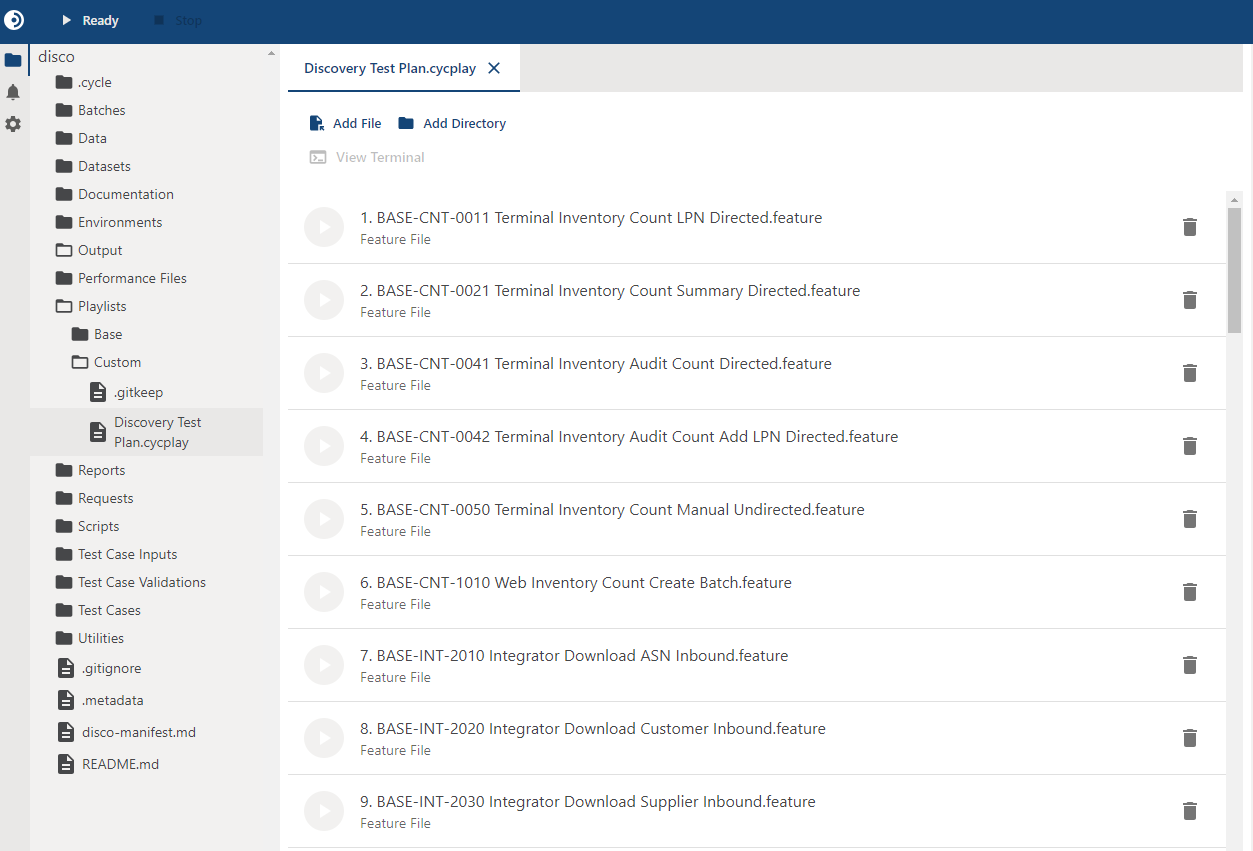
The test plan is Discovery's primary output. It is a set of recommended Cycle tests, assembled from your questionnaire answers and delivered as a playlist you can run.
Before you generate
Two conditions must both be met.
Every applicable question must be answered. The hub reports this as readiness to generate. Questions marked unsure or inapplicable still count as outstanding. See Answering Questions.
You must ask for it. Generation never happens on its own, and the agent does not offer to attempt it early.
If you ask before the questionnaire is complete, the agent tells you which questions are still outstanding instead of producing a partial plan. Finish those, then ask again.
How a test plan is built
Generation is a deterministic translation of your answers, not a fresh interpretation of them:
- Your answers are matched against the rules for the system type to identify which behaviors need coverage.
- Overlapping recommendations are removed, so a behavior identified by several answers produces one test.
- Each remaining recommendation is resolved to a ready-made Feature File in Cycle's test library for that system.
- The result is rendered as a playlist.
An answer counts the same whether you gave it or the config scan recorded it from your configuration export.
Because each recommended test traces back to the answers that produced it, the plan is reviewable. If a test looks wrong, the answer behind it is the thing to revisit, and a review tells you which of the two supplied it.
Previewing before writing
Generation can run as a preview. You see the playlist and the list of files that would be created, and nothing is written to your project.
A preview costs nothing and shows you exactly what would land. This is worth doing in a project that already contains work, so you can see which files would conflict before anything is written.
What gets written
When you generate for real, three things land in your Cycle project:
| Output | Where it goes |
|---|---|
| The tests for the recommended behaviors | Merged into the project from Cycle's test library. Files that are absent are created. Files already identical are skipped. |
| The generated playlist | Playlists/Custom, named Discovery Test Plan unless you ask for a different name. |
| A project manifest | The project root, recording what the plan contains. |
If a file in your project has the same path as a library file but different contents, it is reported as a conflict and left exactly as it is.
Your edits survive generation.
Overwriting a conflict is a separate request you have to make explicitly, and your .cycuser settings file is never overwritten.
Reviewing the result
The agent reports a summary of what happened. Read it rather than moving straight to running the tests, because it is where the gaps are disclosed:
- What the plan covers, and the answers that drove each recommendation.
- The file outcome, separated into created, skipped as identical, and conflicting.
- Recommended tests the library does not yet contain: These are reported rather than dropped quietly, so you know the coverage gap exists and can author those tests yourself.
The summary also names the playlist it wrote and the manifest that records the plan, each with a per-test note explaining which answer produced it. Wording varies by agent, so read for those items rather than for a particular phrasing.
Regenerating after a change
Discovery is not a one-shot activity. As you learn more about the system, change your answers and generate again.
Remember that changing an answer other questions depend on clears those dependent answers. See Changing an answer. The questionnaire can drop out of completion this way, which blocks generation until you resolve what reopened.
Example
You say:
The questionnaire is done. Show me what the test plan would look like before writing anything.
The agent:
- Confirms the questionnaire is complete.
- Generates a preview and reports the playlist contents, the files that would be created, and any that would conflict.
You say:
That looks right. Write it.
The agent:
- Merges the library tests into the project, creating the files that are absent and skipping the ones already identical.
- Writes the playlist to
Playlists/Customand the project manifest. - Reports the summary, including the conflicts it left untouched and any recommended test the library does not contain.
Running the generated test plan
- Executing Playlists: Run the playlist Discovery generated.
- Convert ingested specifications into tests: If you also ran document ingest, the
generate-tests-from-specsprompt turns those specifications into runnable tests. See Prompts. - Resuming Discovery: Share the work with your team, or come back to it later.